
DoorDash - Dasher
DoorDashBusiness
4.6144.80K Reviews
- Version
- 8.104.3
- Installs
- 10.00M
- Age Rating
- Everyone
Screenshots


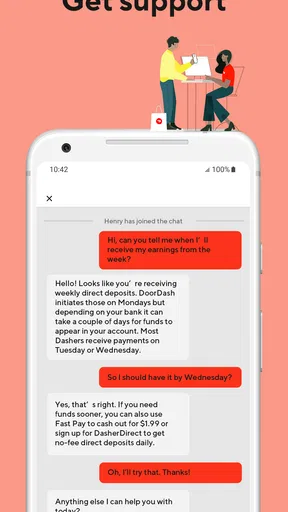
Our Review of DoorDash - Dasher
 Analysis by Appyee
I find that the most useful way to judge DoorDash - Dasher is not by how inviting its idea sounds, but by how well its everyday routine fits your life. It is a free business app from DoorDash for people who want to take delivery work on their own schedule. That flexibility is appealing, but the practical experience still depends on having a dependable phone, understanding your local streets, and being comfortable making quick decisions while out and about.
Getting Started with DoorDash - Dasher
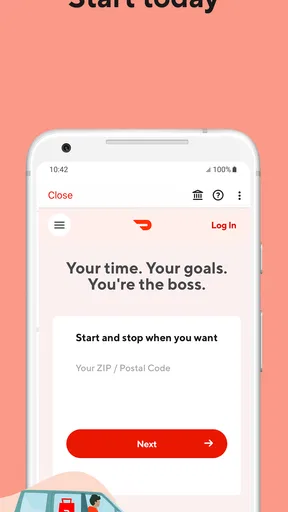
The first thing you'll notice about DoorDash - Dasher is how easy it is to get rolling. Signing up is pretty straightforward. They’ve streamlined the process so you can focus on what's important: getting out there and dashing! Once you're in, the app walks you through everything you need to know with a kind of digital hand-holding that's much appreciated, especially for newbies.
Where New Dashers Can Get Stuck
A guided start can make the app feel simple, but signing up and being ready to work are not quite the same thing. I would treat the initial setup as a task to finish when you have time to read carefully, rather than something to rush through just before heading out. Work through the steps in order, check that the information you enter is accurate, and make sure you understand what the app is asking before moving on. If a screen does not behave as expected, pausing and trying again is usually more sensible than tapping repeatedly or guessing.
Another common source of frustration is expecting the app to remove all uncertainty from delivery work. It can organize the process, but it cannot make a busy restaurant, a hard-to-find entrance, or unfamiliar roads effortless. I’d start with an area I already know, where I can focus on learning the app’s prompts instead of trying to understand every street at once. That small choice can make a first shift feel much less hectic.
Setup Checks Before Heading Out
Before starting a session, I’d check the basics that often get overlooked: the phone has enough charge, mobile data is working, location services are available, and the map can load. A charger in the car or a charged power bank can be more useful than another navigation shortcut; a delivery app that drains the phone is no help if the battery runs out halfway through a route. I’d also make sure the phone is mounted safely and that I can hear or notice notifications without needing to stare at the screen while moving.
The version available now is 8.60.10, and the app supports Android 9 or later. It is rated for Everyone, which describes its content rating rather than making it a promise that delivery work suits every age or situation. DoorDash’s app has been around since December 10, 2013, and it has a 4.3 average from around 566,000 ratings, with more than 10 million installs. Those figures suggest a widely used service, but they cannot tell me whether the app will feel smooth on a particular phone or whether there will be steady work in a particular neighborhood.
The User Experience
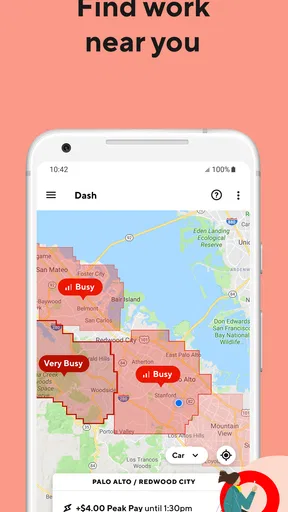
Now, onto the app itself. The interface is clean, intuitive, and doesn’t overload you with unnecessary info. You’ve got your dashboard where you can see orders, earnings, and a handy map to navigate the delivery routes. I really liked how the app lays out the delivery hotspots, so you know where the action is. It’s like having a treasure map, but for food delivery!
Everything is designed to be user-friendly. Swiping through to accept orders feels natural, and the notifications are timely but not intrusive. Plus, they’ve got a neat feature that lets you pause orders if you need a quick break – because, let’s face it, even dashers need a coffee break sometimes.
Making the Routine Work in Real Life
For a practical first outing, I’d choose a time when I am not rushing to another commitment and begin close to familiar roads. I’d keep the phone visible but not handle it while driving, then review the next instruction once safely stopped. If an order takes me somewhere unfamiliar, I’d use the map as a guide and still pay attention to street signs, building numbers, and the actual entrance. Navigation is helpful, but the final few steps often require ordinary observation rather than blind trust in a route line.
A useful habit is to separate the parts of a delivery that require attention. Before setting off, make sure the order details and destination are clear; while traveling, focus on the road; once parked, check the address and any delivery directions again. This reduces the temptation to make a last-second turn or search for a building while moving. It also gives you a calmer way to handle a route change or a confusing location.
On a day when I have a couple of free hours between other plans, the flexibility could be a real advantage: I can decide whether to work, rather than commit to a fixed shift far in advance. But I would not treat the app’s map or busy-looking areas as a guarantee of orders or income. A hotspot is a clue about activity, not a promise. If I were testing whether this could fit my routine, I’d try a short session and note how much time the whole outing takes, including getting to the area and returning home.
Earnings and Flexibility
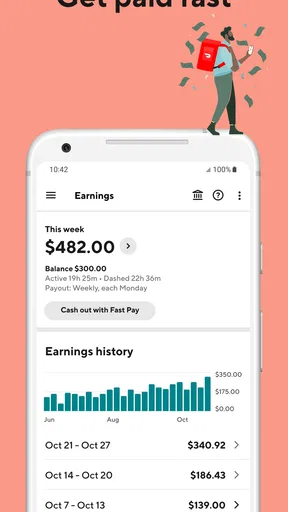
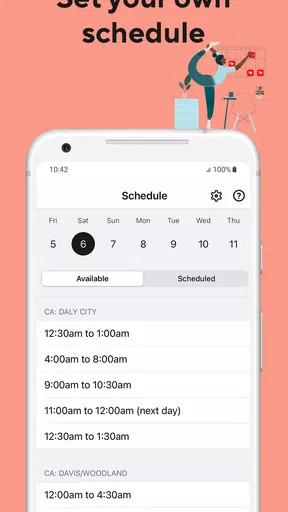
One of the biggest draws for DoorDash - Dasher is the flexibility it offers. You work when you want, where you want. It’s perfect if you’re juggling other commitments or just want to earn some side cash. The app shows you your earnings in real-time, which is super motivating. It’s like having your own personal scoreboard!
While earnings can fluctuate based on location and time, the app does a good job of highlighting peak times to maximize your income. Plus, the option to cash out your earnings quickly is a sweet bonus. No waiting until the end of the week – you can get paid when you need it.
Reading the Earnings Screen Carefully
I would use the earnings display as a way to follow what is happening in the app, not as a complete measure of what a shift is worth to me. A realistic personal comparison includes time spent waiting, driving to a starting area, and getting back afterward. Vehicle costs and other work-related expenses matter too, so a visible total should not be mistaken for take-home profit. Keeping a simple private note after a few sessions can help answer the question that matters: does this work pay enough for the time and effort I put into it?
That kind of check is especially helpful when deciding whether to accept a short window of work. A period that looks promising may not fit if it requires a long trip to reach the active area, while a quieter-looking nearby session may be easier to fit around family, study, or another job. I would compare like with like—similar times and similar areas—rather than draw a conclusion from one unusually busy or slow outing.
For someone comparing delivery work with a conventional part-time job, the trade-off is straightforward. This app is attractive when control over when to go out matters more than a predictable schedule. A scheduled role may be a better match if you need guaranteed hours or want to avoid managing your own travel and downtime. Other delivery platforms may also be worth comparing if they operate where you live, but the best choice depends on local availability and the way each service fits your routine, not just on a general reputation.
When the Workflow Breaks
If the app seems slow or a screen does not update, I would first avoid making duplicate choices. Check whether the phone still has a data connection, give the screen a moment, and then reopen the relevant view if it remains stuck. If the map position looks wrong, confirm that location access is available and that the phone itself can determine its location. Restarting the app or the phone can be a reasonable basic troubleshooting step, but I would do it only when safely stopped and not in the middle of handling a delivery.
When a route looks odd, I would compare the map with the street signs and destination information rather than assume the GPS is always right. If the problem is an unclear address or an inaccessible entrance, that is different from a frozen screen; taking a safe moment to review the instructions is better than repeatedly refreshing the app. For a problem that affects an active order or cannot be resolved with basic checks, use the support options available in the app instead of improvising a workaround that could create more confusion.
Challenges and Considerations
Of course, no app is without its hiccups. Sometimes, the GPS can be a bit wonky, leading to a few "creative" routes. Also, during peak times, the app might lag slightly, but these are minor bumps in an overall smooth ride.
It’s also worth noting that while the app offers flexibility, it requires a bit of hustle to make the most of it. You have to be strategic about when and where you dash. But hey, that’s part of the adventure, right?
There are also limits that better preparation cannot solve. Traffic, weather, parking, and restaurant delays are part of the working environment, not necessarily faults in the software. If a phone has unreliable connectivity or struggles to run navigation, the experience may be frustrating even when the app itself is functioning. I would not recommend relying on it as a source of dependable income without first seeing how work actually fits the area and schedule available to you.
Who It Suits—and Who May Prefer Something Else
I think the app makes most sense for someone who already has a suitable way to travel, knows at least some of the local area, and values choosing when to work. It can also be useful for a person who wants to explore delivery work without immediately committing to a fixed weekly timetable. The pause option is practical when a short break is needed, but it does not change the basic need to stay alert and plan around the realities of being on the road.
I would hesitate to recommend it to someone who needs a guaranteed amount of work or income, dislikes navigating unfamiliar places, or cannot safely check a phone between stops. It may also be a poor fit if vehicle expenses or travel time would outweigh the value of the flexibility. In those cases, a job with set hours, or a different local work option that does not involve deliveries, may be more predictable.
DoorDash, the developer behind the app, has built a recognizable tool for a specific kind of work rather than a general business organizer. That distinction matters: the app’s usefulness is tied to delivery opportunities and a driver’s ability to complete them, so its appeal will vary from one person and location to another. Its 131,000 reviews add another sign that many people have used it, but volume alone should not replace a small personal trial and a clear-eyed look at the effort involved.
In conclusion, DoorDash - Dasher is a fantastic tool for anyone looking to dip their toes into the gig economy. With its user-friendly design and potential for decent earnings, it’s definitely worth checking out. Just remember to keep your phone charged and your map skills sharp. Happy dashing!
My Practical Verdict
My view is that this is a useful, focused app when flexibility is the main reason you are considering delivery work. The dashboard and map give the job a clear structure, and being able to pause can make a shift easier to manage. At the same time, neither a polished interface nor a busy map can remove the less convenient parts: checking routes, handling delays, and deciding whether the time and travel make sense for you.
I would approach it as a trial, not a promise. Get comfortable with the setup before going out, start in a familiar area, protect your attention while driving, and review your time and expenses after a few sessions. If that routine feels manageable and the local work suits your schedule, the app can be a practical way to take on delivery shifts. If you need reliable hours, dislike on-the-go navigation, or find the travel costs too high, choosing a more predictable alternative is a sensible decision.
Privacy and Permissions
See what permissions an app requests and how it handles your data.
- Identity
- read your own contact card
- Contacts
- read your contacts, modify your contacts
- Location
- approximate location (network-based), precise location (GPS and network-based)
- Phone
- directly call phone numbers, read phone status and identity
- Photos/Media/Files
- read the contents of your USB storage, modify or delete the contents of your USB storage
- Storage
- read the contents of your USB storage, modify or delete the contents of your USB storage
- Camera
- take pictures and videos
- Microphone
- record audio
- Wi-Fi connection information
- view Wi-Fi connections
- Device ID & call information
- read phone status and identity
- Other
- view network connections, pair with Bluetooth devices, access Bluetooth settings, change network connectivity, connect and disconnect from Wi-Fi, control flashlight, full network access, change your audio settings, control Near Field Communication, run at startup, draw over other apps, control vibration, prevent device from sleeping, Google Play license check, read Google service configuration
Verdict
Strengths of DoorDash - Dasher
- Flexible working hours for dashers.
- User-friendly interface for easy navigation.
- Real-time tracking for seamless deliveries.
- Wide availability in many regions.
- Instant pay option for quick earnings.
Limitations of DoorDash - Dasher
- High competition can reduce job availability.
- App may drain battery quickly.
- Occasional app glitches during peak hours.
- Limited support for technical issues.
- Earnings vary based on location and demand.
Other Releases by DoorDash
View All
DoorDash: Food, Grocery, More
Food & Drink4.7
Similar Picks in This Category
View All
LinkedIn: Community & Network
LinkedIn3.8

Zoom Workplace
zoom.com4.1

Microsoft Teams
Microsoft Corporation4.6

Meta Business Suite
Meta Platforms, Inc.4.6

Webex Meetings
Cisco Systems, Inc.4.5

TeamViewer Remote Control
TeamViewer4.4
Frequently Asked Questions
What is DoorDash - Dasher, and how does it work?
DoorDash - Dasher is a mobile application that allows individuals to sign up as delivery drivers, or "Dashers," to deliver food and other items from local restaurants and stores to customers. Once you register and pass a background check, you can start accepting delivery requests, earn money for each delivery, and manage your earnings through the app.
What are the requirements to become a Dasher?
To become a Dasher, you must be at least 18 years old, have access to a vehicle or bicycle (depending on the city), possess a valid driver’s license and insurance, and pass a background check. Additionally, you’ll need a smartphone to use the Dasher app, which is available on both Android and iOS.
How do Dashers get paid, and how often?
Dashers are paid weekly via direct deposit to their bank account. The payments include base pay, tips, and any promotions or bonuses earned. For those who want faster access to their earnings, DoorDash offers an option called Fast Pay, which allows Dashers to cash out their earnings daily for a small fee.
What kind of support is available for Dashers?
DoorDash offers a range of support options for Dashers, including in-app support for quick assistance during deliveries, a comprehensive FAQ section, and a dedicated help center with resources and articles. Additionally, Dashers can reach out to DoorDash support via phone or email for more personalized help.
Are there any expenses or fees Dashers should be aware of?
While signing up as a Dasher is free, there are some expenses to consider, such as vehicle maintenance, gas, and phone data usage. Additionally, if you choose to use the Fast Pay feature for quicker payouts, there is a small fee per transaction. It's important to manage these expenses to maximize earnings effectively.
